TESTYN.com
TESTYN.com
Test Management Platform for QA Teams
TESTYN.com

Manage test cases, execute runs, and report results — one platform your entire QA team will actually want to use.

Sign in withGoogle,GitHuborMicrosoft— no separate account needed
Trusted by QA teams shipping faster
app.testyn.com / runs / v2.4.0-rc
Testyn run execution view
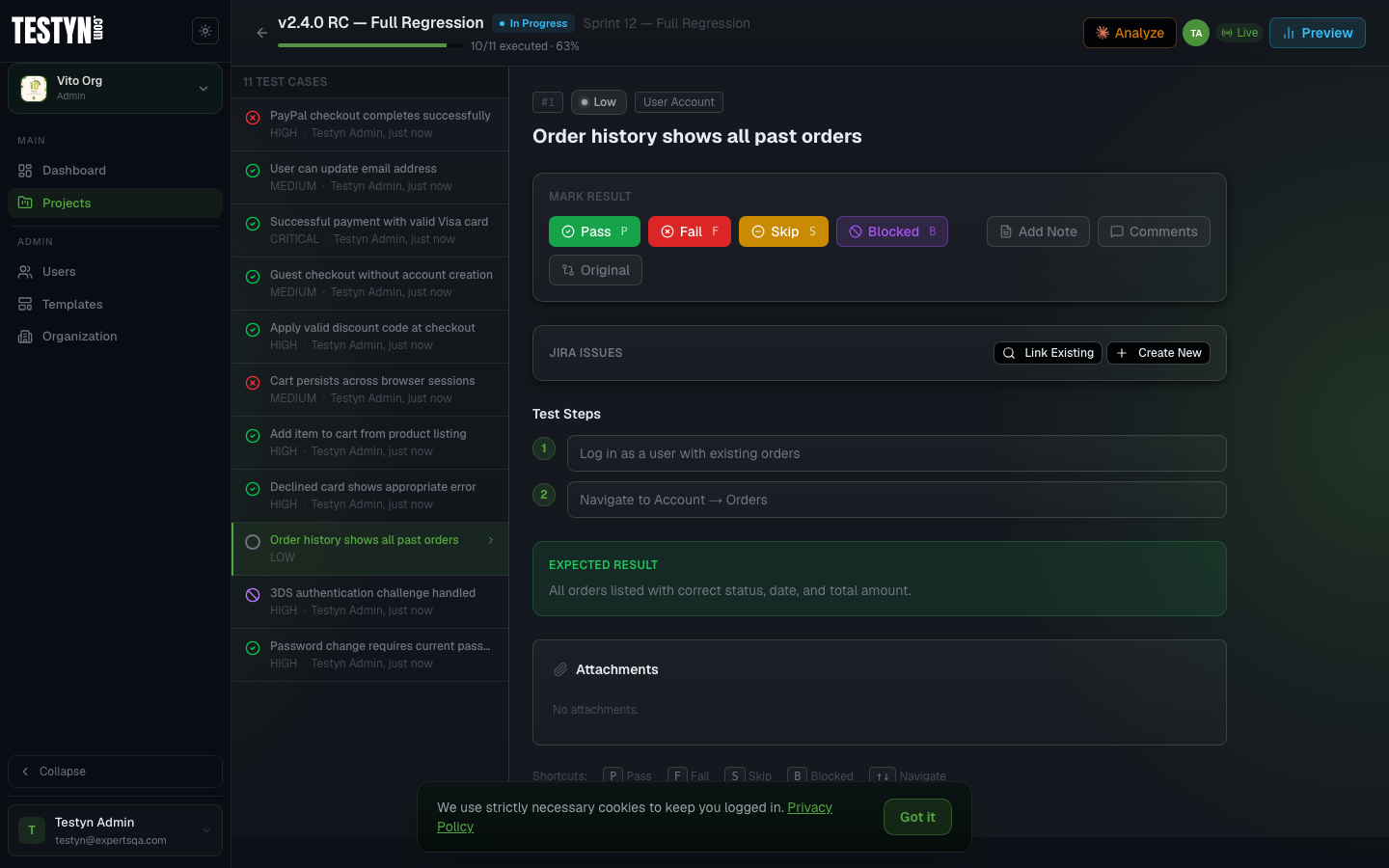
Test Execution

Execute runs and capture results in real time

Step through test cases with your team, mark pass, fail, blocked, or skipped, and watch progress update live as everyone executes. No page refresh needed.

  • Live progress bar — completion % updates as your team works
  • Inline notes and defect links attached to each result
  • Keyboard shortcuts for rapid pass/fail marking
  • Server-Sent Events for real-time collaboration without conflicts
  • Run report generated automatically when the run completes
app.testyn.com / runs
Run execution view
app.testyn.com / suites
Test cases view
Test Case Management

Organize every test case, suite, and folder

Build your test library from scratch or import from Markdown, Excel, or your existing testing tools. Prioritize, tag, and filter to find exactly what you need — instantly.

  • Import from Markdown, Excel, and other testing tools in one click
  • Priority levels: Critical, High, Medium, Low
  • Folder hierarchy to group related cases by feature or module
  • Tag cases and filter by category, priority, or keyword
  • Full audit trail — every change tracked with who and when
Project Hub

Everything your team needs, beyond test cases

The Hub brings your QA project together with team collaboration tools built into the same workspace — no context-switching to other tools.

Task Board
Kanban board for QA tasks and action items — Todo, In Progress, Blocked, Done.
Work Logs
Log daily activities, track time per task, and run daily standup check-ins.
Meeting Notes
Capture meeting notes and action items, linked directly to your project.
Reporting
Generate structured QA reports for any team member or the whole project — select sections and export as PDF.
app.testyn.com / hub
Project Hub
Reports & Analytics

Data-driven quality insights

From per-run breakdowns to release-level pass rate trends — Testyn gives you the visibility to make confident shipping decisions.

Run Reports

Detailed per-run breakdown: pass/fail/blocked counts, per-case results with tester notes, and shareable links for stakeholders.

Milestone Summaries

Aggregate results across all runs in a milestone. See release-level pass rates and coverage at a glance — ready for management reviews.

Analytics Dashboard

Track pass rate trends over time, test velocity, flaky tests, and tester activity across your project's history.

100%Web-basedNo install required — works from any browser.
4+Import formatsMarkdown, Excel, and other testing tools.
LiveReal-time runsResults update as your team executes.
OrganizationsManage multiple orgs from one account.

Everything your QA team needs

Purpose-built tools to streamline testing from case creation to reporting.

Test Case Management

Organize cases into suites and folders. Import from Markdown, Excel, or your existing testing tools with a single upload.

Test Run Execution

Assign testers, step through cases, and track pass, fail, and blocked results in real time.

Reports & Analytics

Run reports, milestone summaries, pass rate trends, and tester activity — all in one analytics view.

Automation Integration

Upload JUnit or CTRF results and merge automated runs with your manual testing data seamlessly.

Task Board

Kanban board built into every project — track QA action items from Todo through to Done.

Work Logs & Standup

Log daily work activities and run daily standups directly inside your project.

Meeting Notes

Capture meeting notes and action items in a structured, searchable format per project.

Reporting

Generate polished QA reports for any team member or the whole project and export them as PDF for management reviews.

Team & Roles

Invite teammates, assign Project Manager or Tester roles per project, and keep everyone aligned.

Milestones

Group runs under a release or sprint milestone and track quality gates before shipping.

Multi-Organization

Work across multiple organizations from a single account — perfect for consultants and agencies.

REST API

Integrate Testyn into any CI/CD pipeline using the REST API with Bearer token authentication.

Jira Integration

Link Jira issues to failed test cases, create bugs directly from test execution, and see issue status on run reports.

Slack Notifications

Send instant Slack alerts when runs fail, tests break, or Jira bugs are filed — straight to your team channel.

GitHub Integration

Link or create GitHub Issues from failed test cases and see live issue state on run reports — all without leaving Testyn.

Google, GitHub & Microsoft

Sign in with your Google, GitHub, or Microsoft account — no separate password needed.

Integrations

Connect your existing tools

Testyn plugs into the tools your team already uses — so bugs get tracked and nothing falls through the cracks.

Jira Integration

Atlassian Jira Cloud

Connect your Jira Cloud project to Testyn and bring issue tracking right into your QA workflow. When a test case fails, link or create a Jira bug without leaving the test execution page — and see live issue status directly on your run reports.

Configured per project. Supports both API token authentication and OAuth 2.0. No context switching, no copy-pasting issue keys.

Link existing issues

Search your Jira project by key or keyword and attach issues to any test result.

Create bugs instantly

Open a new Jira bug pre-filled with the test case name, steps, and expected result — one click from the execution page.

Issue status on reports

Run reports show linked Jira issue keys and their current status. No tab switching to check progress.

Add comments

Post comments to linked Jira issues directly from the test result panel.

Per-project setup

Each Testyn project connects to its own Jira project. Settings are managed under Project Settings → Integrations.

API token or OAuth

Authenticate with a personal API token or use OAuth 2.0 for team-wide access.

Slack Integration

Slack Incoming Webhooks

Keep your team in the loop without leaving Slack. Connect a webhook to any project and get instant notifications when a run fails, tests break, or a Jira bug is filed — right in your team channel.

No OAuth, no bot tokens. Paste a webhook URL in Project Settings, choose which events you care about, and you're done.

Run failure alerts

Get notified the moment a test run completes with failures — before anyone has to check.

Run completion

Optionally notify on every completed run, pass or fail, to keep the team synced on testing progress.

Individual test failures

Fire a message each time a single test case is marked as failed during execution.

Jira bug filed

Notify the channel when a Jira issue is created from a test result, with a direct link to the ticket.

Per-project webhooks

Each project has its own webhook URL and event toggles. No cross-project noise.

Block Kit messages

Rich, structured messages with project name, run stats, and a direct link back to Testyn.

GitHub Integration

GitHub Issues · OAuth

Connect your GitHub account to Testyn and link issues right from the test execution page. When a test fails, search your repo for an existing issue or create a new one pre-filled with the test case steps — without switching tabs.

Each user connects their own GitHub account via OAuth. Repository is configured per project. Issue state (open or closed) is cached and refreshed automatically on run reports.

Per-user OAuth

Each team member connects their own GitHub account. No shared tokens or service accounts needed.

Search existing issues

Search your GitHub repo by keyword and attach any open or closed issue to a test result in one click.

Create issues instantly

Open a new GitHub issue pre-filled with the test case name, steps, and expected result — straight from the execution page.

Live state on reports

Run reports show a GitHub Issues column with issue numbers and open/closed state, refreshed automatically.

Default labels

Configure default labels per project (e.g. bug, qa) so every created issue is tagged correctly from the start.

Per-project repo

Each Testyn project targets its own GitHub repository. Configure owner, repo name, and labels under Project Settings → Integrations.

Azure DevOpsComing soon

Sync test results with Azure Boards and Pipelines.

Get started in minutes

How it works

01

Create your organization

Sign up and set up your organization. Invite your team and assign roles for each project.

02

Add test cases

Build suites manually or import from your existing tools. Organize cases with folders and tags.

03

Run and report

Launch test runs, capture results as you go, and share polished reports with stakeholders.

About us

Built by QA engineers.
For QA engineers.

We spent years running test cases in spreadsheets and paying hundreds per seat for tools that looked like enterprise software from 2009. Every time we needed something simple — a run report, a reusable template, a milestone summary — it took three clicks too many.

So we built Testyn. A QA platform that's fast, opinionated, and affordable. One that the whole team will actually open every morning — not dread.

No investors. No bloated roadmap driven by enterprise sales. Just engineers building the tool they always wanted.

Testyn is built and maintained by ExpertsQA — a team of QA engineers and consultants.

We believe

QA tools should get out of your way. Not add three new meetings to your sprint just to learn them.

We believe

Good QA is a competitive advantage. Every bug caught before release is a customer kept — and a late night avoided.

We believe

Your test management tool shouldn't cost more than your cloud bill. QA teams deserve great software at a fair price.

We believe

Every feature should earn its place. Everything in Testyn exists because a QA engineer asked for it — including us.

Get in touch

Need help or have a feature request?

Testyn is built by a small team that genuinely cares about QA workflows. You talk directly to the people who build it — no support tickets, no bots.

Whether you need help getting your team set up, want a custom import format, or have a feature idea that would make your workflow 10× better — reach out. We act fast.

Onboarding helpWe'll walk your team through setup personally
Feature requestsReal requests go straight into our backlog
Custom integrationsNeed a specific import or API hook? Let's talk
Or email us directly at testyn@expertsqa.com

Send us a message

Opens your email client with the message pre-filled. We typically respond within 24 hours.

Ready to level up your QA process?

Join QA teams that ship software with confidence. Free to get started — no credit card required.

Create free account